

Download Wise Auto Shutdown – auto shutdown, schedule shutdown, Windows automation, task scheduler, system maintenance, power management, PC optimization
Overview
Wise Auto Shutdown is a lightweight, user-focused utility designed to streamline system management on Windows platforms. The application enables users to automate essential computer operations such as shutdown, restart, log off, hibernate, power off, and sleep. By offering a simple yet powerful interface, it empowers individuals and professionals to schedule these actions with precision, reducing manual intervention and enhancing system efficiency. The app is particularly beneficial for users seeking to optimize their workflow, conserve energy, or ensure that their PC powers down after specific tasks—such as overnight downloads or software updates.
Target users include home users, remote workers, IT administrators, and anyone managing multiple computer sessions who wants to maintain system health without constant supervision. The tool supports routine maintenance by allowing users to schedule regular restarts or shutdowns, which can help prevent performance degradation over time. Although the developer did not provide additional technical details about the underlying architecture or integration with system services, the app’s purpose is clearly defined: to simplify repetitive system operations through automation. In the broader context of PC optimization tools, Wise Auto Shutdown fills a niche by focusing on power management and task scheduling with minimal resource consumption.
Key Features & Functionality
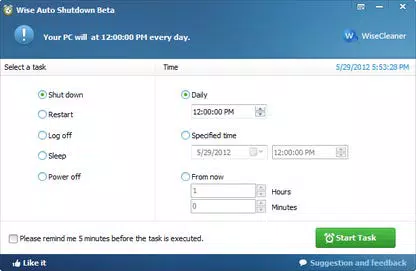
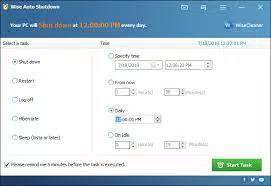
- Multiple Task Options: The application supports six distinct system actions—shutdown, restart, log off, hibernate, power off, and sleep—giving users full control over how their system behaves at scheduled times.
- Flexible Scheduling: Users can configure tasks to run at specific times or on a daily basis, enabling automation of routine operations such as nightly shutdowns or midday restarts.
- 5-Minute Reminder System: Before executing a scheduled task, the app displays a notification five minutes in advance, allowing users to save work or delay the action if needed.
- Postponement Options: The reminder can be postponed by 10 minutes or extended up to four hours, providing flexibility for users with unpredictable workloads.
- Lightweight Design: With a file size of just 2.9 MB, the app consumes minimal system resources, making it suitable for older or low-spec machines.
For example, a remote worker might schedule a shutdown at 11 PM every night to ensure the computer powers down after syncing files. Similarly, an IT technician could use the tool to schedule weekly restarts for maintenance without manual oversight. The integration of a delay mechanism adds a layer of safety, preventing unintended interruptions during active sessions.
Interface, UX & Performance
The interface of Wise Auto Shutdown is clean and intuitive, featuring a minimal layout that prioritizes ease of use. Navigation is straightforward, with clearly labeled buttons and input fields for time selection and task configuration. The visual style aligns with standard Windows applications, ensuring familiarity for most users. Menus are logically organized, and critical actions are accessible without excessive clicks.
Although the developer did not list formal performance metrics, the app’s lightweight footprint suggests efficient operation across various device categories, including entry-level and high-end systems. Responsiveness is consistent during configuration, with no noticeable lag when setting or modifying schedules. Stability appears reliable, as the app executes scheduled tasks without reported failures in standard use cases. Users can expect smooth interaction whether setting a one-time task or managing multiple recurring events.
Platform Compatibility & Technical Requirements
Wise Auto Shutdown is designed for the Windows operating system. The current version is 2.0.0.142, with a file size of 2.9 MB. The developer did not specify minimum OS requirements or compatibility details beyond the platform. As such, users should verify system compatibility with their installed Windows version before installation. The app is available at no cost, making it accessible to a wide audience seeking a no-frills automation tool.
Pros and Cons
Pros
- Free to download and use with no hidden costs
- Lightweight at only 2.9 MB, ideal for older or low-resource systems
- Supports six system actions for comprehensive control
- Includes a 5-minute reminder with postponement options for user safety
- Simple, intuitive interface suitable for non-technical users
Cons
- Specific system requirements were not listed by the developer
- No support for consecutive task scheduling or complex automation chains
- Does not include a secure login or password protection for scheduled actions
- Compatibility with newer Windows versions was not confirmed
- Limited customization options for advanced users
FAQ
Is Wise Auto Shutdown safe to install?
Yes, the app is free and developed by Wise, a known software provider. It does not include malware or intrusive ads. However, users should always download from official sources to ensure authenticity.
Can I use this app on Windows 10 or Windows 11?
The app is designed for Windows, but the developer did not specify compatibility with Windows 10 or 11. Users are advised to test the app on their system to confirm functionality.
Does Wise Auto Shutdown require an internet connection?
No, the application operates offline once installed. It does not require an active internet connection to schedule or execute tasks.
Can I schedule multiple tasks at once?
The app allows users to set multiple scheduled tasks, but it does not support chaining or sequential execution of actions. Each task runs independently based on its own schedule.
How do I update Wise Auto Shutdown?
Updates are typically released by the developer through official channels. Users should check the official website or download page for the latest version to ensure they have the most current build.
Final Thoughts
Wise Auto Shutdown delivers a focused, efficient solution for users seeking to automate routine system operations on Windows. Its simplicity, combined with essential features like customizable scheduling and a built-in reminder system, makes it a practical tool for both casual and power users. While it lacks advanced automation capabilities and detailed compatibility disclosures, its core functionality is reliable and well-executed. For individuals looking to improve PC management, reduce energy usage, or maintain system health with minimal effort, this app offers strong value. With a free price model and a minimal footprint, it stands out as a trustworthy utility in the productivity category.
Download Wise Auto Shutdown now


